SECUREU

Cybersecurity Fundamentals

Essential cybersecurity knowledge, best practices, tools, and tips for beginners and non-technical audiences.

Top 10 Best Cybersecurity Practices to Follow Each Day

Top 10 Best Cybersecurity Practices to Follow Each Day Do you leave your car unlocked after parking it? Or maybe you go to bed without locking your front door? You don’t, do you? Because, after all, it is much better to be safe than sorry. The same logic can be applied to your information, i.e. your private data. Your information can be shared across the Internet easily at the speed of light. In fact, someone halfway across the world can steal your data without batting an eye. The online world is a dangerous place that all of us must navigate. Poor security practices can put your data — and by extension, you — in the hands of some very shady people who will not hesitate to harm you. Be it managing a website or keeping your devices protected, safe security practices are an essential facet of life in the 21st century. It’s time to pay closer attention to what safe cybersecurity practices in the digital world mean to you. What is Cybersecurity and Why Does it Matter? Cybercrime cost the world $6 trillion in 2021, By 2025, this amount is expected to increase to $10.5 trillion. Though the Internet allows us to access a whole trove of information and resources, it also allows malicious entities to target us. And this goes far, far beyond getting spam emails that try to get your bank details from you. These days, cyber attacks cannot be thwarted simply by antivirus software or firewalls. This is why everyone needs to inculcate good cybersecurity practices in their daily digital behaviour. Cybersecurity is a set of processes, frameworks, and tools that have been created to protect devices, networks, data, and programs from hackers. Cybercrime is a problem that is relevant to all of us today and implementing good cybersecurity practices is an essential first step to take to avoid falling prey to cyberattacks. Why Do We Need Good Cybersecurity Practices in Daily Life? According to experts, 80% of cybercrime frauds occur due to a lack of good cybersecurity practices. In order to protect yourself from malicious actors, you need to know how to conduct yourself online in the digital space. You need to be aware of what good cybersecurity practices are and what actions make you unsafe and leave you open to being exploited. Not following the best cybersecurity practices can spell disaster for you. It is possible for your bank information to be stolen, or even your identity. Hackers may attempt to collect your private data and sell it. Some possible cybercrimes are To prevent yourself from being stuck in such a situation, we have compiled a list of 10 cybersecurity best practices to help you be safer as you navigate your way through the online world. Top 10 Good Cybersecurity Practices to Follow: Another good cybersecurity practice is to always download files and software from verified sources to avoid malware, virus, and hacker attacks. Avoid using peer-to-peer networks and remove file-sharing clients that are already installed on your devices. As most P2P applications have worldwide sharing turned on by default when you install them, you risk downloading viruses and other malware onto your systems which can lead to your personal information being leaked. What to Do After a Cyberattack? Despite following good cybersecurity practices, it is still possible to fall victim to a cyberattack. Immediately after a cyberattack, you may need to disconnect from the Internet, disable remote access, install any pending security updates or patches, and change passwords. After that, let the proper authorities know by reporting the incident. Contact banks, credit card companies, and other such financial services where you have accounts. You may need to place holds on accounts that have been attacked and report that someone may be impersonating you after stealing your identity. File a report with the local police so that there is an official record of the incident and report identity theft. You will have to contact additional agencies depending on what information was stolen. Following the best cybersecurity practices cannot guarantee that you will never be attacked, however, it reduces the probability of being attacked and can even thwart attacks in some cases. To ensure your online safety, make sure to follow these tips.

Top 10 Best Cybersecurity Practices to Follow Each Day Read More »

Top 10 Best Cybersecurity Practices to Follow Each Day Do you leave your car unlocked after parking it? Or maybe you go to bed without locking your front door? You don’t, do you? Because, after all, it is much better to be safe than sorry. The same logic can be applied to your information, i.e. your private data. Your information can be shared across the Internet easily at the speed of light. In fact, someone halfway across the world can steal your data without batting an eye. The online world is a dangerous place that all of us must navigate. Poor security practices can put your data — and by extension, you — in the hands of some very shady people who will not hesitate to harm you. Be it managing a website or keeping your devices protected, safe security practices are an essential facet of life in the 21st century. It’s time to pay closer attention to what safe cybersecurity practices in the digital world mean to you. What is Cybersecurity and Why Does it Matter? Cybercrime cost the world $6 trillion in 2021, By 2025, this amount is expected to increase to $10.5 trillion. Though the Internet allows us to access a whole trove of information and resources, it also allows malicious entities to target us. And this goes far, far beyond getting spam emails that try to get your bank details from you. These days, cyber attacks cannot be thwarted simply by antivirus software or firewalls. This is why everyone needs to inculcate good cybersecurity practices in their daily digital behaviour. Cybersecurity is a set of processes, frameworks, and tools that have been created to protect devices, networks, data, and programs from hackers. Cybercrime is a problem that is relevant to all of us today and implementing good cybersecurity practices is an essential first step to take to avoid falling prey to cyberattacks. Why Do We Need Good Cybersecurity Practices in Daily Life? According to experts, 80% of cybercrime frauds occur due to a lack of good cybersecurity practices. In order to protect yourself from malicious actors, you need to know how to conduct yourself online in the digital space. You need to be aware of what good cybersecurity practices are and what actions make you unsafe and leave you open to being exploited. Not following the best cybersecurity practices can spell disaster for you. It is possible for your bank information to be stolen, or even your identity. Hackers may attempt to collect your private data and sell it. Some possible cybercrimes are To prevent yourself from being stuck in such a situation, we have compiled a list of 10 cybersecurity best practices to help you be safer as you navigate your way through the online world. Top 10 Good Cybersecurity Practices to Follow: Another good cybersecurity practice is to always download files and software from verified sources to avoid malware, virus, and hacker attacks. Avoid using peer-to-peer networks and remove file-sharing clients that are already installed on your devices. As most P2P applications have worldwide sharing turned on by default when you install them, you risk downloading viruses and other malware onto your systems which can lead to your personal information being leaked. What to Do After a Cyberattack? Despite following good cybersecurity practices, it is still possible to fall victim to a cyberattack. Immediately after a cyberattack, you may need to disconnect from the Internet, disable remote access, install any pending security updates or patches, and change passwords. After that, let the proper authorities know by reporting the incident. Contact banks, credit card companies, and other such financial services where you have accounts. You may need to place holds on accounts that have been attacked and report that someone may be impersonating you after stealing your identity. File a report with the local police so that there is an official record of the incident and report identity theft. You will have to contact additional agencies depending on what information was stolen. Following the best cybersecurity practices cannot guarantee that you will never be attacked, however, it reduces the probability of being attacked and can even thwart attacks in some cases. To ensure your online safety, make sure to follow these tips.

Protecting your mail like a PRO !!!

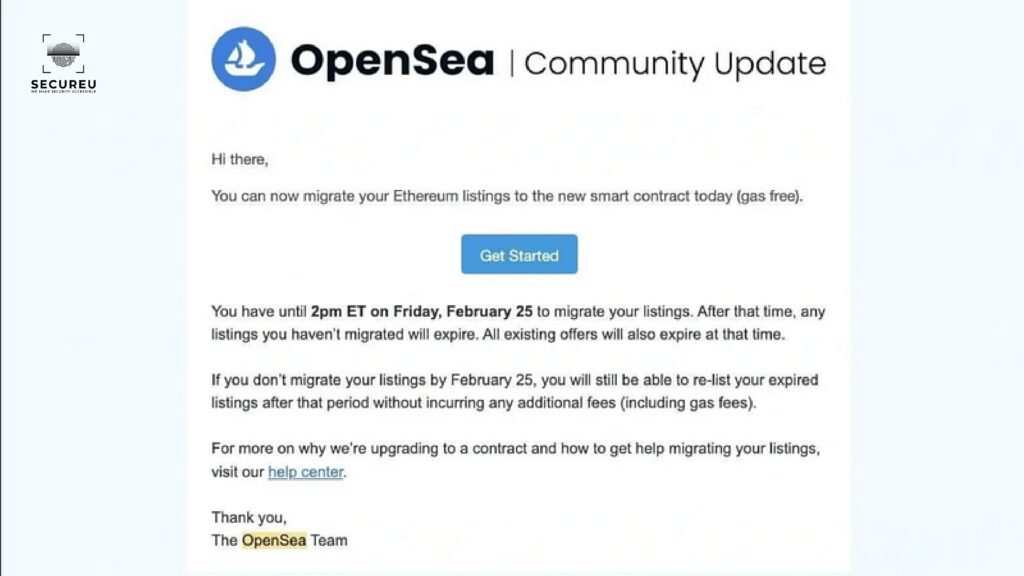
Protecting your mail like a PRO !!! To be true as a tech enthusiast who has been tinkering around with computers longer than I can remember, typing out this blog seems kind of ridiculous. I nearly moved away from my desk and had dropped the idea of writing this but then this happened. The podcast that I listen to occasionally started discussing the hacks that have been going around. You might say it’s a coincidence but right then they started discussing this major email-based phishing attack that was carried out against OpenSea users who bought NFTs on their platform. The attackers had sent an email to the customers of OpenSea that seemed legit at first glance and asked them to migrate their listings with the added bonus of gas-free transactions. If you know anything about the crypto world you know that gas fees (the cost of computing to carry out a transaction) can be pretty high and this bait of “gas-free” migration tempted users to fall for the trap and they ended up losing their NFTs. The total amount of the NFTs that was lost was worth around 1.7 million US dollars. It was then that I realized no matter how many blogs are already up there on the web regarding this. I am going to write one more, to maybe better educate my regular blog readers. Why does phishing exist in the first place? It’s 2022, on one side tech folks are busy creating Web3.0 infrastructure and then there are people still falling for phishing attacks that belong to the Web1.0 days. This begs us to ask the question why do phishing attacks still work in this day and age? People need to understand that email-based phishing attacks still exist cause email as technology was built with trust as an inherent factor. It was built in the early days of the internet when there were only a handful of people using it. They never saw the potential of what email could be and hence they never developed it keeping in mind the millions of spam emails that traverse the internet on a daily basis.It would have been fine if only that was the issue, but then comes in the other reason that’s a bigger contributing factor to why phishing attacks still persist. The reason is that we humans as a species are by default encoded to trust others rather than be suspicious of them. It is only after several mishaps that we learn that goes against our nature and start being suspicious of things that happen around us. So if you ever find yourself shocked by listening to the extent of phishing attacks that are still prevalent in 2022, remember the points that I just mentioned above. “I won’t fall for it” syndrome! One other issue that I have faced when it comes to phishing attacks is that people somehow disregard other peoples’ experiences and think that for some reason they are not vulnerable to such attacks and will easily be able to detect them. Now, read the next few words very carefully. “You are as likely to be vulnerable to a phishing attack just like any other person on this earth”. Please get rid of the “I won’t fall for it” syndrome. People who have written books on phishing attacks and such schemes have failed to detect phishing attacks and fall for it themselves. Side Note: I myself have been duped of a hefty sum of money. They used one of my shortcomings against me. I was unemployed at the time and they somehow managed to convince me to pay them upfront as they can help me land a respectful job. Thinking about it today makes me laugh at how I could have fallen for it. So, trust me when I say greed & fear will somehow make you do things that you can’t even imagine yourself doing in the future. So let me reiterate that it is only when you understand your own shortcomings that you have any chance to securely navigate through the spam and malicious mail that floods your inbox on a regular basis. Now let’s try and find a solution for it! What should we do then? I am glad you asked, now that you properly understand why phishing still exists. Let’s dive into how can we really eradicate it and what we need to do to get that done! One thing you must have understood by now is that phishing will exist as long as we humans continue to utilize emails. It’s a double whammy both from the technological side as well as the psychological side. As a cybersecurity professional I would advise the following good practices to avoid falling for phishing attacks:- Now, if you read the above points and you are able to properly implement them it will keep you secure from every single phishing attack that you might face. The issue is that most people already know these but they feel it to be a hassle every time they have to check these things while using their email. So now let me give you other solutions which aren’t exactly hassle-free but they will help you if you are not able to follow the tips mentioned above and they can also protect you against advanced levels of phishing attacks too. Conclusion If you manage to follow these rules that I just mentioned you should be secure even against the most targeted and advanced phishing attacks and maybe just because of that won’t lose out on thousands of dollars of worth of NFTs, cryptos, and other extremely important personal data. If you think you need more help on this or you need to make your company members aware of these points, feel free to reach out to us. Let us help you up to your security game and make your business and startup feel more trustworthy to your customers. We are eagerly waiting for your call! Reach out to us at SECUREU & let’s

Protecting your mail like a PRO !!! Read More »

Protecting your mail like a PRO !!! To be true as a tech enthusiast who has been tinkering around with computers longer than I can remember, typing out this blog seems kind of ridiculous. I nearly moved away from my desk and had dropped the idea of writing this but then this happened. The podcast that I listen to occasionally started discussing the hacks that have been going around. You might say it’s a coincidence but right then they started discussing this major email-based phishing attack that was carried out against OpenSea users who bought NFTs on their platform. The attackers had sent an email to the customers of OpenSea that seemed legit at first glance and asked them to migrate their listings with the added bonus of gas-free transactions. If you know anything about the crypto world you know that gas fees (the cost of computing to carry out a transaction) can be pretty high and this bait of “gas-free” migration tempted users to fall for the trap and they ended up losing their NFTs. The total amount of the NFTs that was lost was worth around 1.7 million US dollars. It was then that I realized no matter how many blogs are already up there on the web regarding this. I am going to write one more, to maybe better educate my regular blog readers. Why does phishing exist in the first place? It’s 2022, on one side tech folks are busy creating Web3.0 infrastructure and then there are people still falling for phishing attacks that belong to the Web1.0 days. This begs us to ask the question why do phishing attacks still work in this day and age? People need to understand that email-based phishing attacks still exist cause email as technology was built with trust as an inherent factor. It was built in the early days of the internet when there were only a handful of people using it. They never saw the potential of what email could be and hence they never developed it keeping in mind the millions of spam emails that traverse the internet on a daily basis.It would have been fine if only that was the issue, but then comes in the other reason that’s a bigger contributing factor to why phishing attacks still persist. The reason is that we humans as a species are by default encoded to trust others rather than be suspicious of them. It is only after several mishaps that we learn that goes against our nature and start being suspicious of things that happen around us. So if you ever find yourself shocked by listening to the extent of phishing attacks that are still prevalent in 2022, remember the points that I just mentioned above. “I won’t fall for it” syndrome! One other issue that I have faced when it comes to phishing attacks is that people somehow disregard other peoples’ experiences and think that for some reason they are not vulnerable to such attacks and will easily be able to detect them. Now, read the next few words very carefully. “You are as likely to be vulnerable to a phishing attack just like any other person on this earth”. Please get rid of the “I won’t fall for it” syndrome. People who have written books on phishing attacks and such schemes have failed to detect phishing attacks and fall for it themselves. Side Note: I myself have been duped of a hefty sum of money. They used one of my shortcomings against me. I was unemployed at the time and they somehow managed to convince me to pay them upfront as they can help me land a respectful job. Thinking about it today makes me laugh at how I could have fallen for it. So, trust me when I say greed & fear will somehow make you do things that you can’t even imagine yourself doing in the future. So let me reiterate that it is only when you understand your own shortcomings that you have any chance to securely navigate through the spam and malicious mail that floods your inbox on a regular basis. Now let’s try and find a solution for it! What should we do then? I am glad you asked, now that you properly understand why phishing still exists. Let’s dive into how can we really eradicate it and what we need to do to get that done! One thing you must have understood by now is that phishing will exist as long as we humans continue to utilize emails. It’s a double whammy both from the technological side as well as the psychological side. As a cybersecurity professional I would advise the following good practices to avoid falling for phishing attacks:- Now, if you read the above points and you are able to properly implement them it will keep you secure from every single phishing attack that you might face. The issue is that most people already know these but they feel it to be a hassle every time they have to check these things while using their email. So now let me give you other solutions which aren’t exactly hassle-free but they will help you if you are not able to follow the tips mentioned above and they can also protect you against advanced levels of phishing attacks too. Conclusion If you manage to follow these rules that I just mentioned you should be secure even against the most targeted and advanced phishing attacks and maybe just because of that won’t lose out on thousands of dollars of worth of NFTs, cryptos, and other extremely important personal data. If you think you need more help on this or you need to make your company members aware of these points, feel free to reach out to us. Let us help you up to your security game and make your business and startup feel more trustworthy to your customers. We are eagerly waiting for your call! Reach out to us at SECUREU & let’s

A Quick glance at antivirus

A Quick glance at antivirus Antivirus software, as the name suggests, is a program that has been developed to combat the threats that viruses pose. These programs detect viruses and malicious software in the system and then try to remove them from the affected computer system. Antivirus software work as a type of preventative measure as well. So they not only remove a virus from a system but also attempt to stop viruses from affecting your system in the future. These days antivirus software is essential to having a secure and safe system. Let’s take a closer look at it. Virus and Malicious Software A virus is any type of unwanted program that enters a system without the knowledge of the user. It can self-replicate and spread. Viruses perform unwanted and malicious actions that harm a system by affecting its performance or affecting the user’s data and files. Malicious software, also known as malware, is code that has been created to harm computers and laptops and the data present on them. Devices can get infected with malware by accidentally downloading malware that is attached to an email, hidden on a flash drive, or even just by visiting a sketchy website. Once malware makes its way into your system, it can steal your data, encrypt it and make it inaccessible, or even completely erase it. How Does Antivirus Software Work? Antivirus software is specially designed to recognize and remove viruses and other malware from your system. They work by quarantining and/or deleting malicious code and preventing malware from causing damage to your device. These days, antivirus software updates itself automatically to provide better security against newer viruses and malware. Typically, when you install an antivirus on your system, it runs as a background process and scans computers, servers, and mobile devices to detect and inhibit the spread of malware. Many antiviruses include real-time threat detection and protection along with system scans that monitor device and file systems to look for potential risks or vulnerabilities. Basic Functions of Antivirus Software: Some antivirus software will notify users when an infection is detected and ask them if they want to clean the files while others perform this task automatically in the background. Generally, antivirus software must be given privileged access to the system to thoroughly scan the system. This means that antivirus software itself can often be a preferred target for attackers. Researchers have found that remote code execution and other serious vulnerabilities exist in antivirus software products in recent years. What Can Antivirus Software Protect Against? Antiviruses don’t just block viruses. Good antivirus software can help protect a system in the following ways: It should be noted that antivirus software is not only meant to protect systems from attacks carried out via the internet. Viruses can also spread through the use of portable storage devices. A person can plug one of these devices into a computer somewhere and then later bring it home and plug it into a computer with no online capacities and spread some sort of malware in this manner. Good antivirus software programs should come with recovery tools. No antivirus program is flawless and a recovery system will help users get rid of malware that has bypassed an antivirus program’s defenses. Which Antivirus Should I Use? In operating systems that run Windows and Apple computers, antivirus software is usually included for free. If you ensure that the built-in antivirus is switched on, your computer will immediately be safer. Often, new computers will come with a trial version of some antivirus product installed, such as Norton, or McAfee. You can use those but keep in mind that once the trial version expires, you will have to pay to continue using the antivirus. There are cases when attackers use free anti-virus to breach the system of unsuspecting users, so make sure you use reputed paid anti-virus. With so many products available in the market, you should conduct your research to find a product that best meets your requirements. Should I Use Antivirus Products On My Smartphone Or Tablet? If you only install apps and software from official stores such as Google Play or the Apple App store, you don’t need to install antivirus on your device. You should also set apps and even your device itself to update automatically to immediately get new security patches. Reach out to us at SECUREU & let’s talk about how we can help you! Website: https://secureu.in | E-mail: contact-us@secureu.in | Contact us: Telegram, Twitter Youtube & LinkedIn

A Quick glance at antivirus Read More »

A Quick glance at antivirus Antivirus software, as the name suggests, is a program that has been developed to combat the threats that viruses pose. These programs detect viruses and malicious software in the system and then try to remove them from the affected computer system. Antivirus software work as a type of preventative measure as well. So they not only remove a virus from a system but also attempt to stop viruses from affecting your system in the future. These days antivirus software is essential to having a secure and safe system. Let’s take a closer look at it. Virus and Malicious Software A virus is any type of unwanted program that enters a system without the knowledge of the user. It can self-replicate and spread. Viruses perform unwanted and malicious actions that harm a system by affecting its performance or affecting the user’s data and files. Malicious software, also known as malware, is code that has been created to harm computers and laptops and the data present on them. Devices can get infected with malware by accidentally downloading malware that is attached to an email, hidden on a flash drive, or even just by visiting a sketchy website. Once malware makes its way into your system, it can steal your data, encrypt it and make it inaccessible, or even completely erase it. How Does Antivirus Software Work? Antivirus software is specially designed to recognize and remove viruses and other malware from your system. They work by quarantining and/or deleting malicious code and preventing malware from causing damage to your device. These days, antivirus software updates itself automatically to provide better security against newer viruses and malware. Typically, when you install an antivirus on your system, it runs as a background process and scans computers, servers, and mobile devices to detect and inhibit the spread of malware. Many antiviruses include real-time threat detection and protection along with system scans that monitor device and file systems to look for potential risks or vulnerabilities. Basic Functions of Antivirus Software: Some antivirus software will notify users when an infection is detected and ask them if they want to clean the files while others perform this task automatically in the background. Generally, antivirus software must be given privileged access to the system to thoroughly scan the system. This means that antivirus software itself can often be a preferred target for attackers. Researchers have found that remote code execution and other serious vulnerabilities exist in antivirus software products in recent years. What Can Antivirus Software Protect Against? Antiviruses don’t just block viruses. Good antivirus software can help protect a system in the following ways: It should be noted that antivirus software is not only meant to protect systems from attacks carried out via the internet. Viruses can also spread through the use of portable storage devices. A person can plug one of these devices into a computer somewhere and then later bring it home and plug it into a computer with no online capacities and spread some sort of malware in this manner. Good antivirus software programs should come with recovery tools. No antivirus program is flawless and a recovery system will help users get rid of malware that has bypassed an antivirus program’s defenses. Which Antivirus Should I Use? In operating systems that run Windows and Apple computers, antivirus software is usually included for free. If you ensure that the built-in antivirus is switched on, your computer will immediately be safer. Often, new computers will come with a trial version of some antivirus product installed, such as Norton, or McAfee. You can use those but keep in mind that once the trial version expires, you will have to pay to continue using the antivirus. There are cases when attackers use free anti-virus to breach the system of unsuspecting users, so make sure you use reputed paid anti-virus. With so many products available in the market, you should conduct your research to find a product that best meets your requirements. Should I Use Antivirus Products On My Smartphone Or Tablet? If you only install apps and software from official stores such as Google Play or the Apple App store, you don’t need to install antivirus on your device. You should also set apps and even your device itself to update automatically to immediately get new security patches. Reach out to us at SECUREU & let’s talk about how we can help you! Website: https://secureu.in | E-mail: contact-us@secureu.in | Contact us: Telegram, Twitter Youtube & LinkedIn

The Meaning of VPN

The Meaning of VPN A VPN (Virtual Private Network) describes the opportunity to create a protected network connection when you use a public network. VPNs give you privacy and anonymity online by establishing a private network from a public internet connection. They hide your IP address so that your online activity is virtually untraceable. VPNs create secure and encrypted connections to give you, even more, privacy compared to a secure WiFi hotspot. Virtual private networks are an essential privacy tool that one should use when they are logging onto the internet from a public place like a coffee shop or a hotel lobby, or any other place that provides access to free public WiFi. A VPN creates a kind of tunnel that masks your online activity such as the links you clicked or downloaded files so that hackers, businesses, government agencies, etc., cannot see it. Once your internet traffic has been encrypted and your online activity disguised, third parties will have a tough time tracking your online activities and stealing your data. How Does a VPN Work? A VPN can hide your IP address by making the network redirect it through a specially configured remote server run by a VPN host. If you surf online with a VPN, its server becomes the source of your data. Because of this, your internet service provider and other third parties cannot view the data you send or receive or which websites you visit while online. VPNs work like filters that transform all your data into “gibberish” by encrypting it. So, even if someone were able to access your data, it would be futile. A VPN can extend a corporate network through encrypted connections made over the Internet. As the traffic between the device and the network is encrypted, the traffic remains private as it travels. Due to this, employees working outside the office can still securely connect to the corporate network. Smartphones and tablets can also connect through the use of VPNs. Why Should You Use a VPN? Your Internet Service Provider (ISP) may share your browsing history with other parties like advertisers or government agencies. ISPs can also be attacked by cybercriminals. If an ISP gets hacked, your personal and private data can be leaked. If you regularly connect to public WiFi networks, this is especially important. Someone might be monitoring your internet traffic without your knowledge and they may steal your passwords, personal data, payment information, or even your identity. What Are The Benefits Of A VPN Connection? VPN connections disguise your data traffic online and protect it from external unauthorized access. If data is not encrypted, it can be seen by anyone with network access. With VPNs, cybercriminals cannot decipher your data. This is why VPNs are considered important privacy tools. The benefits of VPNs are listed below: Secure Encryption: Without an encryption key, it would take millions of years for a computer to decipher code in case of a brute-force attack. If you use a VPN, your online activity is hidden even on public networks. Access to Regional Content: Some web content may not be accessible in certain regions. Often, services and websites will contain content that is only accessible from certain parts of the world. Standard connections make use of local servers in the country to ascertain your location. This is why you cannot access some international content from home. VPNs have location spoofing due to which you can switch to a server in another country and “change” your location. Hiding Your Location: In essence, VPN servers act as your proxies on the internet. As the demographic location data comes from a server in a different country, your real location cannot be ascertained. Additionally, most VPN servers do not store logs of your online activities. On the other hand, certain internet service providers record your activities but do not hand over this information to third parties. This means that any possible records of your user behavior remain hidden for good. Secure Data Transfer: While working remotely, you might need access to important files on your company’s network. For security purposes, this information requires a secure connection. To acquire access to the network, a VPN connection is required. VPNs connect to private servers and make use of encryption techniques to reduce the risk of data leakage. How To Surf Securely With A VPN VPNs encrypt your surfing activities which cannot be decoded unless one has the key. The key is only known to your computer and the VPN. This means that your ISP cannot determine where you are surfing. Different VPNs use different encryption processes, but they generally work in three steps: It is a good idea to invest in a good VPN. Many antiviruses these days come with a VPN. You can protect not only your privacy but also your company’s. Reach out to us at SECUREU & let’s talk about how we can help you!

The Meaning of VPN Read More »

The Meaning of VPN A VPN (Virtual Private Network) describes the opportunity to create a protected network connection when you use a public network. VPNs give you privacy and anonymity online by establishing a private network from a public internet connection. They hide your IP address so that your online activity is virtually untraceable. VPNs create secure and encrypted connections to give you, even more, privacy compared to a secure WiFi hotspot. Virtual private networks are an essential privacy tool that one should use when they are logging onto the internet from a public place like a coffee shop or a hotel lobby, or any other place that provides access to free public WiFi. A VPN creates a kind of tunnel that masks your online activity such as the links you clicked or downloaded files so that hackers, businesses, government agencies, etc., cannot see it. Once your internet traffic has been encrypted and your online activity disguised, third parties will have a tough time tracking your online activities and stealing your data. How Does a VPN Work? A VPN can hide your IP address by making the network redirect it through a specially configured remote server run by a VPN host. If you surf online with a VPN, its server becomes the source of your data. Because of this, your internet service provider and other third parties cannot view the data you send or receive or which websites you visit while online. VPNs work like filters that transform all your data into “gibberish” by encrypting it. So, even if someone were able to access your data, it would be futile. A VPN can extend a corporate network through encrypted connections made over the Internet. As the traffic between the device and the network is encrypted, the traffic remains private as it travels. Due to this, employees working outside the office can still securely connect to the corporate network. Smartphones and tablets can also connect through the use of VPNs. Why Should You Use a VPN? Your Internet Service Provider (ISP) may share your browsing history with other parties like advertisers or government agencies. ISPs can also be attacked by cybercriminals. If an ISP gets hacked, your personal and private data can be leaked. If you regularly connect to public WiFi networks, this is especially important. Someone might be monitoring your internet traffic without your knowledge and they may steal your passwords, personal data, payment information, or even your identity. What Are The Benefits Of A VPN Connection? VPN connections disguise your data traffic online and protect it from external unauthorized access. If data is not encrypted, it can be seen by anyone with network access. With VPNs, cybercriminals cannot decipher your data. This is why VPNs are considered important privacy tools. The benefits of VPNs are listed below: Secure Encryption: Without an encryption key, it would take millions of years for a computer to decipher code in case of a brute-force attack. If you use a VPN, your online activity is hidden even on public networks. Access to Regional Content: Some web content may not be accessible in certain regions. Often, services and websites will contain content that is only accessible from certain parts of the world. Standard connections make use of local servers in the country to ascertain your location. This is why you cannot access some international content from home. VPNs have location spoofing due to which you can switch to a server in another country and “change” your location. Hiding Your Location: In essence, VPN servers act as your proxies on the internet. As the demographic location data comes from a server in a different country, your real location cannot be ascertained. Additionally, most VPN servers do not store logs of your online activities. On the other hand, certain internet service providers record your activities but do not hand over this information to third parties. This means that any possible records of your user behavior remain hidden for good. Secure Data Transfer: While working remotely, you might need access to important files on your company’s network. For security purposes, this information requires a secure connection. To acquire access to the network, a VPN connection is required. VPNs connect to private servers and make use of encryption techniques to reduce the risk of data leakage. How To Surf Securely With A VPN VPNs encrypt your surfing activities which cannot be decoded unless one has the key. The key is only known to your computer and the VPN. This means that your ISP cannot determine where you are surfing. Different VPNs use different encryption processes, but they generally work in three steps: It is a good idea to invest in a good VPN. Many antiviruses these days come with a VPN. You can protect not only your privacy but also your company’s. Reach out to us at SECUREU & let’s talk about how we can help you!

Choosing a VPN

Choosing a VPN In today’s age, VPNs are an essential tool for maintaining privacy. But how does one pick a VPN that meets their needs from a multitude of options available in the market? Since there are so many different kinds of VPNs, it is important to take a look at their features and then pick one according to your needs. Let’s take a look at things to keep in mind while selecting a VPN. We rely on VPNs to perform more than one task. It is also important that the VPN itself be protected from being compromised. Here are some of the features that you can expect from an extensive, exhaustive VPN solution: What Are The Different Kinds Of VPNs? There are many different types of VPNs available in the market. Here are the 3 main types that you should know about: Site-to-Site VPN Site-to-site VPNs are private networks designed to hide private intranets and allow their users to access each other’s resources. If you have multiple locations in your company, each with its local area network connected to the wide area network, then site-to-site VPNs are useful. They also come in handy when there are two separate intranets between which you want to send data without users from one intranet accessing the other. As site-to-site VPNs are difficult to implement and are not as flexible as SSL VPNs, they are mainly used in large companies. Despite these problems, they are the most effective way to guarantee communication between large departments. SSL VPN Often, companies may not have enough equipment for their employees. In such cases, employees have to resort to using private devices. In these instances, companies have to rely on SSL VPN solutions which are usually implemented via a hardware box. Usually, an HTML-5 capable browser is used to call up the company’s login page as a prerequisite. HTML-5 capable browsers are available for pretty much any OS. Access is protected with a username and password. Client-to-Server VPN You can imagine connecting through a VPN client as if you are connecting to your home computer to the company using an extension cable. Employees can log into the company network from their home office using a secure connection as if they were present in the office. To do this, a VPN client needs to be installed and configured on the computer. This involves the user not connecting to the internet through their ISP but rather establishing a direct connection through their VPN provider. In essence, this shortens the tunnel phase of the VPN cycle. Rather than using the VPN to create an encryption tunnel to disguise the existing internet connection, the VPN can encrypt the data automatically before it is made available to the user. This is a prevalent type of VPN, that is very useful for providers of insecure public WLAN. It stops third parties from gaining access to and compromising the network connection and encrypts data up to the provider. In addition to this, ISPs are prevented from accessing data that remains unencrypted for whatever reason and sidestep any restrictions on the user’s internet access. This type of VPN is advantageous as it is more efficient and provides universal access to company resources. Installing A VPN On Your Computer There are different implementation methods of VPNs and it is important to know about them before you proceed with installing a VPN: VPN Client: For standalone VPN clients, software that is configured to fulfill the requirements of the endpoint must be installed. The endpoint implements the VPN link and connects to the other endpoint, creating the encryption tunnel when setting up the VPN. Usually, in companies, a password issued by the company or the installation of an appropriate certificate is required. Passwords and certificates allow firewalls to recognize authorized connections. Then, the employee can identify themselves with their credentials. Router VPN: For many devices connected to the same internet connection, it can be easier to implement the VPN on the router itself than to install a separate VPN on each device. Router VPNs come in handy when you want to protect devices that are not easy to configure, like smart TVs. They may even allow you to access geographically restricted content through home entertainment systems. Router VPNs are easy to install, provide privacy and security, and protect your network from being compromised when insecure devices connect to it. It is worth noting, however, that if your router does not have a user interface, the router VPN will be difficult to manage and can lead to incoming connections being blocked. Browser Extensions: You can add VPN extensions to most web browsers. Some browsers such as Opera have their VPN extensions integrated into them. While extensions make it easier and faster for users to switch and configure their VPN, the VPN connection is only valid for data that is shared in this browser. Using different browsers and other uses of the internet such as playing online games cannot be encrypted by VPN. It should be noted that although browser extensions are not as exhaustive as VPN clients, they may be an adequate alternative for occasional internet users who desire an extra layer of security on the internet. However, it has been found that browser extensions are more prone to breaches. Users should also make sure to choose a reputable extension as data harvesters make use of fake VPN extensions to collect their private data. Advertising content is then tailored to you using this data. Company VPN: Company VPNs are custom solutions that need personalized technical support and setup. It is usually created by the company’s IT team for you. Users have no administrative influence from the VPN. Activities and data transfers are logged by the company. This helps companies minimize the risk of potential data leakage. The major advantage of corporate VPNs is that they are completely secure connections to the company’s intranet and server even for employees who work outside the company and use their internet connection. Can VPNs Be

Choosing a VPN Read More »

Choosing a VPN In today’s age, VPNs are an essential tool for maintaining privacy. But how does one pick a VPN that meets their needs from a multitude of options available in the market? Since there are so many different kinds of VPNs, it is important to take a look at their features and then pick one according to your needs. Let’s take a look at things to keep in mind while selecting a VPN. We rely on VPNs to perform more than one task. It is also important that the VPN itself be protected from being compromised. Here are some of the features that you can expect from an extensive, exhaustive VPN solution: What Are The Different Kinds Of VPNs? There are many different types of VPNs available in the market. Here are the 3 main types that you should know about: Site-to-Site VPN Site-to-site VPNs are private networks designed to hide private intranets and allow their users to access each other’s resources. If you have multiple locations in your company, each with its local area network connected to the wide area network, then site-to-site VPNs are useful. They also come in handy when there are two separate intranets between which you want to send data without users from one intranet accessing the other. As site-to-site VPNs are difficult to implement and are not as flexible as SSL VPNs, they are mainly used in large companies. Despite these problems, they are the most effective way to guarantee communication between large departments. SSL VPN Often, companies may not have enough equipment for their employees. In such cases, employees have to resort to using private devices. In these instances, companies have to rely on SSL VPN solutions which are usually implemented via a hardware box. Usually, an HTML-5 capable browser is used to call up the company’s login page as a prerequisite. HTML-5 capable browsers are available for pretty much any OS. Access is protected with a username and password. Client-to-Server VPN You can imagine connecting through a VPN client as if you are connecting to your home computer to the company using an extension cable. Employees can log into the company network from their home office using a secure connection as if they were present in the office. To do this, a VPN client needs to be installed and configured on the computer. This involves the user not connecting to the internet through their ISP but rather establishing a direct connection through their VPN provider. In essence, this shortens the tunnel phase of the VPN cycle. Rather than using the VPN to create an encryption tunnel to disguise the existing internet connection, the VPN can encrypt the data automatically before it is made available to the user. This is a prevalent type of VPN, that is very useful for providers of insecure public WLAN. It stops third parties from gaining access to and compromising the network connection and encrypts data up to the provider. In addition to this, ISPs are prevented from accessing data that remains unencrypted for whatever reason and sidestep any restrictions on the user’s internet access. This type of VPN is advantageous as it is more efficient and provides universal access to company resources. Installing A VPN On Your Computer There are different implementation methods of VPNs and it is important to know about them before you proceed with installing a VPN: VPN Client: For standalone VPN clients, software that is configured to fulfill the requirements of the endpoint must be installed. The endpoint implements the VPN link and connects to the other endpoint, creating the encryption tunnel when setting up the VPN. Usually, in companies, a password issued by the company or the installation of an appropriate certificate is required. Passwords and certificates allow firewalls to recognize authorized connections. Then, the employee can identify themselves with their credentials. Router VPN: For many devices connected to the same internet connection, it can be easier to implement the VPN on the router itself than to install a separate VPN on each device. Router VPNs come in handy when you want to protect devices that are not easy to configure, like smart TVs. They may even allow you to access geographically restricted content through home entertainment systems. Router VPNs are easy to install, provide privacy and security, and protect your network from being compromised when insecure devices connect to it. It is worth noting, however, that if your router does not have a user interface, the router VPN will be difficult to manage and can lead to incoming connections being blocked. Browser Extensions: You can add VPN extensions to most web browsers. Some browsers such as Opera have their VPN extensions integrated into them. While extensions make it easier and faster for users to switch and configure their VPN, the VPN connection is only valid for data that is shared in this browser. Using different browsers and other uses of the internet such as playing online games cannot be encrypted by VPN. It should be noted that although browser extensions are not as exhaustive as VPN clients, they may be an adequate alternative for occasional internet users who desire an extra layer of security on the internet. However, it has been found that browser extensions are more prone to breaches. Users should also make sure to choose a reputable extension as data harvesters make use of fake VPN extensions to collect their private data. Advertising content is then tailored to you using this data. Company VPN: Company VPNs are custom solutions that need personalized technical support and setup. It is usually created by the company’s IT team for you. Users have no administrative influence from the VPN. Activities and data transfers are logged by the company. This helps companies minimize the risk of potential data leakage. The major advantage of corporate VPNs is that they are completely secure connections to the company’s intranet and server even for employees who work outside the company and use their internet connection. Can VPNs Be

Proven Ways to Secure Your Computer Network

Proven Ways to Secure Your Computer Network Businesses face threats from multiple sources in many ways, and the more users, apps, and devices they add, the more susceptible their network becomes. Let’s take a look at how companies can secure their networks. What is Network Security? Any activity that is designed to protect the integrity and usability of the network and data is called network security. This includes hardware as well as software technologies. Good network security manages access to the network and targets a variety of threats to stop them from entering or spreading on a network. How Does Network Security Work? Network security merges various layers of defenses at the edges of and in a network. Policies and controls are implemented at each network security layer. Malicious actors are prevented from carrying out threats and exploits whereas authorized users are allowed to get access to network resources. How Do You Benefit From Network Security? Each organization needs to protect its network. Our world has changed due to digitization. The way we live, work, and even play has changed. Network security helps businesses protect their private information and thus, protects their reputation. Ways to Protect Your Network It is difficult to know how to secure a network for small and medium-sized businesses that do not have IT staff to take care of system maintenance full-time. Luckily, there are some network security practices that organizations can use to secure their data and hopefully build better defenses against hackers and viruses. A firewall is a piece of software or hardware that has been designed to prevent unauthorized access to computers and networks. To simplify, it is a set of rules that controls network traffic. Computers and networks that “abide by the rules” are allowed into access points. The ones that don’t follow the rules are stopped from accessing your system. A firewall is an integral part of the defense of your network. If you do not have a firewall in place, you should make sure to set up a firewall as soon as possible. Firewalls can be set up on individual devices and your antivirus software may include firewall protection in it. It is worth noting that firewalls can also be set up as a WAF (Web Application Firewall). Web Application Firewalls protect web apps by monitoring and filtering HTTP traffic between the internet and a web application. A WAF is akin to a shield placed in front of a web application, separating it and the internet. It protects the server from being exposed by making clients pass through the WAF before getting to the server. A WAF is especially important for businesses that sell products online and store customer information. A WAF helps protect this stored data. The latest firewalls are integrated network security platforms that comprise a variety of encryption methods and approaches, all working together to prevent breaches. 2. Advanced Endpoint Detection Advanced endpoint detection and response uses AI to look for signs of compromise and react accordingly to respond to the ever-evolving world of online threats. This technology gathers and analyses information obtained from network devices, endpoint logs and threat intelligence feeds, and using this data it identifies security incidents, fraudulent activity, and other threats. To respond faster, a high degree of automation is employed to allow security teams to quickly identify and respond to threats. Signs of compromised behavior can range from characteristics related to threat actor inclusion to ransomware and malware and general virus-like behavior. Advanced Endpoint Detection is more advanced compared to antivirus software and is a part of a layered, modern, and proactive approach to cybersecurity to help defend against the always-changing attack of hackers. 3. Update Passwords Often Employees must know to avoid default passwords such as “12345”, “password” and their dates of birth. While using good passwords that feature a combination of upper and lowercase letters as well as numbers and symbols, is important, it should be mandatory for employees to regularly change passwords used on systems that have access to business networks. Employees need to be informed that substituting letters with similar-looking characters is not a good idea. For example, choosing “pa$$word” instead of “password” will not work as hackers are aware of this trick. The more often a password is changed, the better. The recommended frequency of password changes is once every quarter as changing passwords too often can cause confusion and lead to employees being unable to remember their user IDs and passwords. It should be noted that many businesses now make use of two-factor authentication to connect to the network. Along with a username and password, users also need to enter a code that they receive through text or email or another such means to connect to a network or system. 4. Creating Virtual Private Networks VPN stands for Virtual Private Network. It is a service that protects your privacy and internet connection online. It encrypts your network to ensure online privacy for all users. As it hides your IP address and makes your online activity virtually untraceable, you can safely use public Wi-Fi hotspots. VPNs create a secure connection between remote computers like home networks or computers and other “local” computers and servers. It blocks your data, history, communications, and other information from hackers. VPNs are essentially only accessible to people who can have access to your systems, wireless network, and to equipment that has been authorized in the network settings. VPNs can drastically decrease the probability of hackers being able to find a wireless access point and wrecking your system 5. Encrypting Files The idea of hackers invading your private networks is a cause for alarm. However, if all they find is a bunch of gibberish, is the idea still as alarming? Encryption prevents your data from being read and can protect sensitive data on Windows or macOS by using software designed to mask your IP address. You can find out if a website has been secured with encryption by looking for “HTTPS” in the address bar

Proven Ways to Secure Your Computer Network Read More »

Proven Ways to Secure Your Computer Network Businesses face threats from multiple sources in many ways, and the more users, apps, and devices they add, the more susceptible their network becomes. Let’s take a look at how companies can secure their networks. What is Network Security? Any activity that is designed to protect the integrity and usability of the network and data is called network security. This includes hardware as well as software technologies. Good network security manages access to the network and targets a variety of threats to stop them from entering or spreading on a network. How Does Network Security Work? Network security merges various layers of defenses at the edges of and in a network. Policies and controls are implemented at each network security layer. Malicious actors are prevented from carrying out threats and exploits whereas authorized users are allowed to get access to network resources. How Do You Benefit From Network Security? Each organization needs to protect its network. Our world has changed due to digitization. The way we live, work, and even play has changed. Network security helps businesses protect their private information and thus, protects their reputation. Ways to Protect Your Network It is difficult to know how to secure a network for small and medium-sized businesses that do not have IT staff to take care of system maintenance full-time. Luckily, there are some network security practices that organizations can use to secure their data and hopefully build better defenses against hackers and viruses. A firewall is a piece of software or hardware that has been designed to prevent unauthorized access to computers and networks. To simplify, it is a set of rules that controls network traffic. Computers and networks that “abide by the rules” are allowed into access points. The ones that don’t follow the rules are stopped from accessing your system. A firewall is an integral part of the defense of your network. If you do not have a firewall in place, you should make sure to set up a firewall as soon as possible. Firewalls can be set up on individual devices and your antivirus software may include firewall protection in it. It is worth noting that firewalls can also be set up as a WAF (Web Application Firewall). Web Application Firewalls protect web apps by monitoring and filtering HTTP traffic between the internet and a web application. A WAF is akin to a shield placed in front of a web application, separating it and the internet. It protects the server from being exposed by making clients pass through the WAF before getting to the server. A WAF is especially important for businesses that sell products online and store customer information. A WAF helps protect this stored data. The latest firewalls are integrated network security platforms that comprise a variety of encryption methods and approaches, all working together to prevent breaches. 2. Advanced Endpoint Detection Advanced endpoint detection and response uses AI to look for signs of compromise and react accordingly to respond to the ever-evolving world of online threats. This technology gathers and analyses information obtained from network devices, endpoint logs and threat intelligence feeds, and using this data it identifies security incidents, fraudulent activity, and other threats. To respond faster, a high degree of automation is employed to allow security teams to quickly identify and respond to threats. Signs of compromised behavior can range from characteristics related to threat actor inclusion to ransomware and malware and general virus-like behavior. Advanced Endpoint Detection is more advanced compared to antivirus software and is a part of a layered, modern, and proactive approach to cybersecurity to help defend against the always-changing attack of hackers. 3. Update Passwords Often Employees must know to avoid default passwords such as “12345”, “password” and their dates of birth. While using good passwords that feature a combination of upper and lowercase letters as well as numbers and symbols, is important, it should be mandatory for employees to regularly change passwords used on systems that have access to business networks. Employees need to be informed that substituting letters with similar-looking characters is not a good idea. For example, choosing “pa$$word” instead of “password” will not work as hackers are aware of this trick. The more often a password is changed, the better. The recommended frequency of password changes is once every quarter as changing passwords too often can cause confusion and lead to employees being unable to remember their user IDs and passwords. It should be noted that many businesses now make use of two-factor authentication to connect to the network. Along with a username and password, users also need to enter a code that they receive through text or email or another such means to connect to a network or system. 4. Creating Virtual Private Networks VPN stands for Virtual Private Network. It is a service that protects your privacy and internet connection online. It encrypts your network to ensure online privacy for all users. As it hides your IP address and makes your online activity virtually untraceable, you can safely use public Wi-Fi hotspots. VPNs create a secure connection between remote computers like home networks or computers and other “local” computers and servers. It blocks your data, history, communications, and other information from hackers. VPNs are essentially only accessible to people who can have access to your systems, wireless network, and to equipment that has been authorized in the network settings. VPNs can drastically decrease the probability of hackers being able to find a wireless access point and wrecking your system 5. Encrypting Files The idea of hackers invading your private networks is a cause for alarm. However, if all they find is a bunch of gibberish, is the idea still as alarming? Encryption prevents your data from being read and can protect sensitive data on Windows or macOS by using software designed to mask your IP address. You can find out if a website has been secured with encryption by looking for “HTTPS” in the address bar

Scroll to Top